

What safety precautions should be taken when using a digital insulation tester on live circuits
2026-05-12
When working with energized electrical systems, a Digital Insulation Tester is an indispensable tool for assessing insulation integrity without shutting down critical infrastructure. However, using a Digital Insulation Tester on live circuits introduces significant risks. Following rigorous safety protocols is not optional—it is essential for protecting both the operator and the equipment. Brands like Weshine have engineered advanced safety features into their Digital Insulation Tester models, but technology alone cannot replace correct procedures. Below is a professional guide to the mandatory precautions when using a Digital Insulation Tester on live circuits.
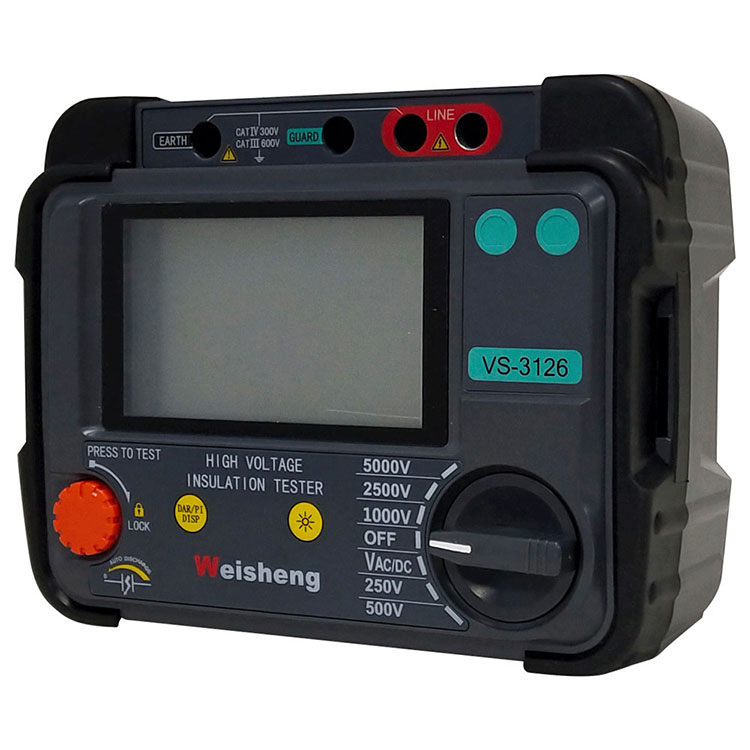
Primary Safety Precautions
| Safety Measure | Purpose | Execution Example |
|---|---|---|
| Personal Protective Equipment (PPE) | Prevent arc flash and electric shock | Wear rubber insulating gloves, safety goggles, and flame-resistant clothing |
| Category Rating Verification | Ensure the device is rated for the circuit | Use only a Digital Insulation Tester with CAT III 600V or higher for industrial panels |
| Two-Person Rule | Reduce human error | One operator handles the Digital Insulation Tester, another monitors conditions |
| Lead and Probe Inspection | Avoid insulation breakdown on probes | Check for cracks or exposed metal before each use |
| Proper Grounding | Divert fault currents safely | Connect the guard terminal of your Weshine Digital Insulation Tester to known earth ground |
Step-by-Step Safe Workflow
-
Risk Assessment – Confirm that testing on live circuits is absolutely necessary. De-energize if possible.
-
Tester Verification – Test a known voltage source with the Digital Insulation Tester to confirm its operation.
-
Connection Sequence – Connect the ground lead first, then the probe to the conductor under test.
-
Reading Interpretation – Observe the Digital Insulation Tester display while keeping hands behind the probe guard.
-
Discharge Process – After testing, use the built-in automatic discharge function (standard on Weshine models) before disconnecting.
Digital Insulation Tester FAQ
Q: Can a Digital Insulation Tester be used on any live circuit without damaging the meter?
A: No. A Digital Insulation Tester applies a high voltage (typically 250V, 500V, 1000V, or 5000V) to measure resistance. If the circuit has electronic components (VFDs, PLCs, soft starters), the applied high voltage will destroy them. Use the Digital Insulation Tester only on de-energized equipment or on pure resistive/inductive loads that are designed to withstand the test voltage. For sensitive electronics, a low-voltage insulation tester or a megger with electronic protection (such as Weshine’s auto-detect series) is required.
Q: What happens if I touch a live conductor while the Digital Insulation Tester is active?
A: An electric shock will occur, potentially fatal. While a Digital Insulation Tester outputs high voltage (e.g., 1000V+), the current is limited (usually below 2mA under normal conditions). However, if the insulation is severely compromised, the tester may deliver higher transient currents. Additionally, the open-circuit voltage can reach several thousand volts. Always maintain a minimum clearance distance, wear appropriate insulated gloves rated for the test voltage, and use test probes with finger guards. Weshine devices include a live circuit warning indicator that alerts you if the circuit is unexpectedly energized above 30V AC/DC.
Q: How do I discharge a circuit after using a Digital Insulation Tester on a live cable
A: First, understand that a Digital Insulation Tester charges the cable’s capacitance during testing. Immediately after the test, the cable can retain a dangerous voltage. Reputable Weshine models have an automatic discharge function that displays “discharging” on screen. You must wait until the voltage drops below 50V before disconnecting probes. If your Digital Insulation Tester lacks this feature, manually short all conductors to ground using a properly rated grounding stick and keep them grounded for at least three times the testing duration. Never assume the cable is safe just because the tester’s display has turned off.
Best Practices for Live Circuit Testing
The table below summarizes key operational dos and don’ts when using a Digital Insulation Tester on live systems.
| Do | Don’t |
|---|---|
| Verify the Digital Insulation Tester has a valid calibration label | Don’t exceed the maximum input voltage rating (e.g., 600V AC/DC) |
| Use a Weshine Digital Insulation Tester with double insulation and CAT IV protection | Don’t hold the probe tips with bare fingers |
| Keep a log of all live tests including date, location, and reading | Don’t assume a reading of “0.00 MΩ” means the circuit is dead |
| Stand on a dry insulating mat while operating the tester | Don’t use a Digital Insulation Tester in wet or condensing environments |
| Clean the Digital Insulation Tester terminals before each connection | Don’t bypass the guard terminal when testing long cables |
Conclusion
Using a Digital Insulation Tester on live circuits demands respect for high voltage, strict adherence to lockout-tagout alternatives, and equipment that meets international safety standards. Weshine provides Digital Insulation Tester solutions with built-in live voltage detection, automatic discharge, and overload protection—but safe outcomes depend on the operator’s knowledge.
Contact us today for a detailed application guide or to request a demo of the Weshine Digital Insulation Tester series. Our engineering team will help you build a customized testing protocol that prioritizes safety without compromising productivity.
